
Working Model 2004 New Features*
Click here for a PDF version of this document
Overview
*Runs on Microsoft® Windows® only (2000/XP/Vista/7)
1. Improved ability to create flexible bodies (Flexbeams)
Significant new features have extended the popular Flexbeam script:
- Create flexible beams in bending mode, extension mode, or both
- Create flexible beams from rectangles and four-sided polygons (tapered beams) in any orientation
- Automatically heal polygons before creating flexible beams
- Re-attach constraints and points attached to the original body
- Create sliders for bending and/or extension stiffness and damping
- Significantly increase the maximum number of flexible beam elements
- Improve error checking
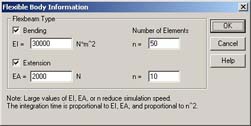
Flexbeam input dialog box
|
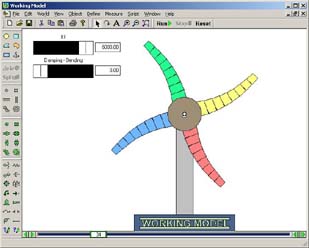
Sample Flexbeam output
|
Back to top
2. DC Motor and DC Actuator
|
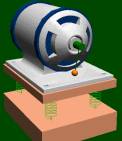
Model DC motors and DC actuators with the following input parameters:
- Motor Resistance (R)
- Motor Inductance (L)
- Motor Back-EMF Speed Constant (Kv)
- Motor Force/Torque Constant (Km)
- Motor Input Voltage (Vi)
|
|
The value of these parameters can be set with a number, slider, or any Interactive
Physics formula.
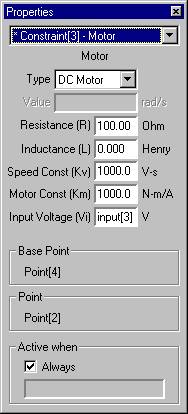
DC motor properties
|
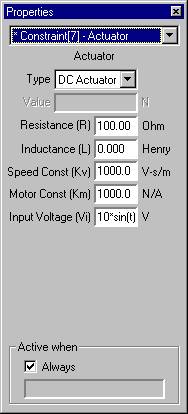
DC actuator properties
|
Back to top
3. Generic Coord-to-Coord Constraint
- The Generic Coord-to-Coord Pin Constraint is a powerful tool for advanced users
and is useful for combining properties and measurements of various torque-producing
devices, including torsional springs, torsional dampers, torque motors, rotational
friction, and torques.
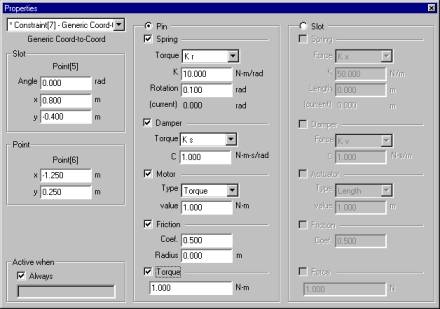
Generic Coord-to-Coord Properties - Pin
- The Generic Coord-to-Coord Slot Constraint is a powerful tool for advanced users
and is useful for combining properties and measurements of forces along slots,
including dampers, actuators, friction, and forces.
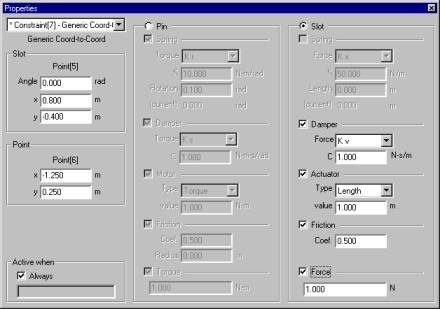
Generic Coord-to-Coord Properties - Slot
Back to top
4. Generic Point-to-Point Constraint
-
The Generic Point-to-Point Constraint is a powerful tool for advanced users and is
useful for combining properties and measurements of rods, ropes, separators, springs,
dampers, actuators, and forces.
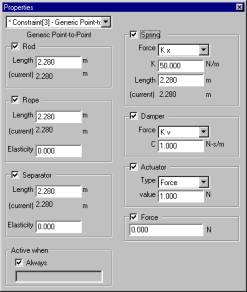
Generic Point-to-Point Properties
Back to top
5. DXF import expanded to version 12 through version 2000
Updated CAD DXF import now supports DXF versions 12, 13, 14, and 2000. In addition,
DXF import automates certain conversions from arcs and line segments to polygons.
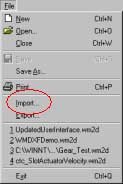
DXF Import
|

Sample DXF import
|
Back to top
6. Dynamic memory allocation for objects
With dynamic memory allocation, the number of bodies, constraints, points, inputs,
and output meters used in a simulation is limited only by your computer's memory.
Back to top
7. Tutorial guide (PDF format) now included - a $50 value
The PDF version of the tutorial guide is now included on the Working Model CD.
With nine comprehensive exercises that emphasize the fundamental tools of motion simulation technology,
this tutorial guide takes the user from beginning concepts to building a functional working model. Topics include:
- Introductory Demonstration
- Double-slotted rod
- Piston Engine
- Cruise Control with MATLAB
- Belt-Driven Camshaft
- Scripting
- Making Visually Appealing Models
- Earthquake Simulation
- Advanced Scripting
Back to top
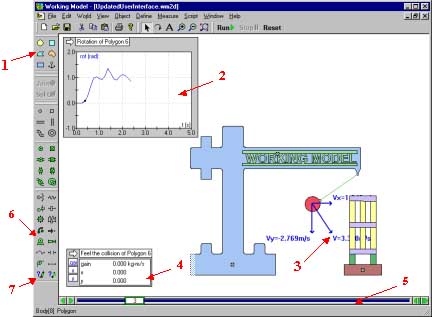
8. Updated user interface
- New default colors for bodies
- New graphs and graphing options
- Vector values can be displayed with vectors
- New meter for feeling motion and/or collision (requires a force-feedback mouse or joystick)
- New colors in the Run toolbar
- New DC motor and DC actuator
- New generic joints
Back to top
9. Improved graphing capabilities
New graphing capabilities allow you to control:
- Thickness of curves and lines
- Plot background and frame colors
- Scaling of curves and lines
- Display of X and/or Y axes, grid lines, or grid labels
- Grid line colors
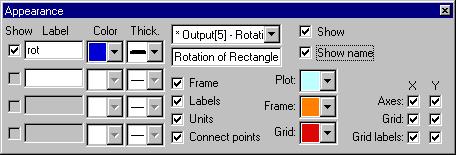
New: Appearance dialog box for graphs
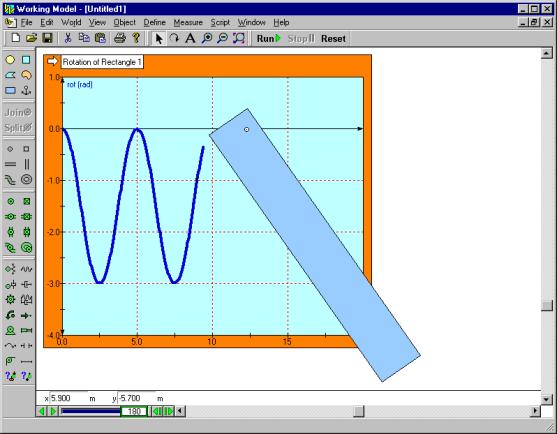
Showing a body's motion in an improved graph
Back to top
10. Instantaneous vector values can be displayed with vectors
The value of various vectors and their components can be displayed on screen.
The vector values change dynamically as the simulation runs and provides excellent
visual feedback on the magnitude/direction characteristics of vectors.
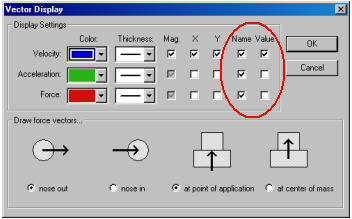
Updated Vector Display dialog box
|
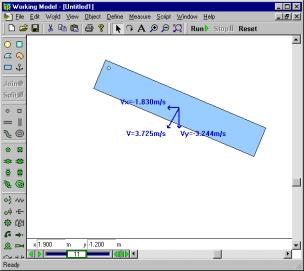
Instantaneous values shown with the vectors
|
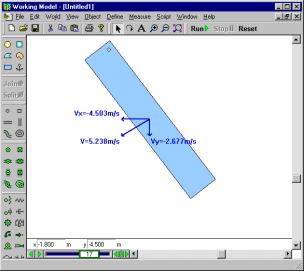
Note: Vector values change as the simulation runs
|
Back to top
11. Color of bodies can be linked to a formula and vary with time, velocity, force, ...
Color of bodies can be controlled with the extensive Interactive Physics formula
language. Enter constants, equations, conditions, etc., in the RGB components of
the body color.
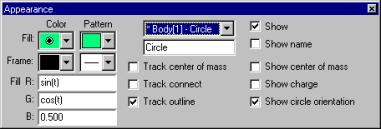
Appearance dialog box for bodies
|
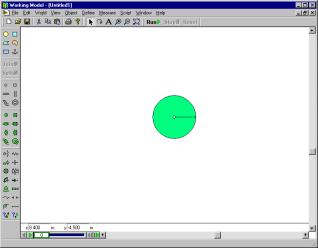
Body color at frame 0 (t = 0s)
|
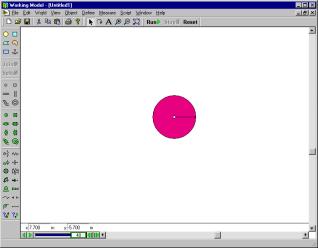
Body color at frame 40 (t = 2s)
|
Back to top
12. Feel the motion and/or collision (requires a force-feedback mouse or joystick)
Feel the motion and/or collision of bodies through a force-feedback mouse or joystick.
Choose the default effect or an effect from the Immersion Studio library of mouse and sound effects.
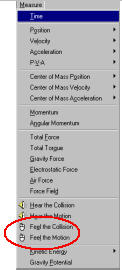
Select Feel the Motion or Feel the collision
|
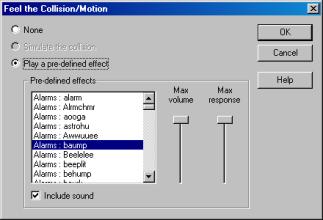
Choose haptics effects, volume, and response
|
Back to top
Design Simulation Technologies, Inc.
Tel. - 800.766.6615 or 734-446-6935
Fax - 734-259-4207
Web - http://www.design-simulation.com
Email - email us at 
|