
Release Notes
SimWise 9.9.0.3594
Release Notes for SimWise 9.9.0.3594
Version 9.9.0 Build: 3542
Version 9.9.0 is major update to SimWise
New and enhanced capabilities
SimWise 9.9 contains the following new and upgraded capabilities:
- New Frequency Reponse FEA Analysis.
- New Reaction force display capabilities in FEA.
- New polyhedral import options.
- New Orthotropic and Anisotropic materal property support.
New Frequency Reponse FEA Analysis
A new analysis type for doing frequency response analysis is now available.
Frequency response analysis is used to calculate the steady-state response due to a sinusoidal load applied to a structure at a single frequency. It is a specialized type of transient response analysis that is extremely efficient to solve.
Unlike Modal Analysis which only calculates the natural frequencies and the corresponding mode shapes, frequency response analysis calculates the actual deformations and stresses that occur with a particular set of structural loads and restraints. It does this by varying the loads in a sinusoidal manner and calculating the resulting response at each frequency of interest. It allows the frequency ranges that could cause problems with the part to be identified.
See the Frequency Response video for more information.
As a result of the additional analysis type added, the FEA Options page has changed to be this:
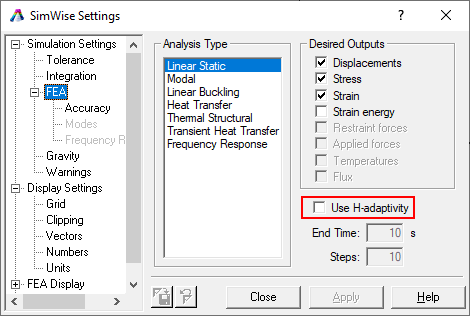
Also note that the H-Adaptive option is no longer specified as a separate analysis type. It is now an option when Linear Static is selected as the analysis type.
New Reaction force display capabilities in FEA
SimWise FEA can display reaction forces calculated by a linear static, thermal/structural, or Frequecny response analysis. Once an analysis has completed and results are display the cursor can be placed over an FEA restraint and the reaction forces on this restraint will be displayed in the displayed tool tip.
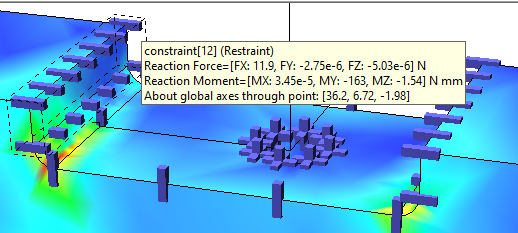
The reaction forces are also displayed when a Simulation Report is created.
New polyhedral import options
An interface has been developed to allow CAD models developed in the Onshape system to be imported into SimWise. Onshape parts and assemblies are supported and Onshape assembly constraints are converted to SimWise constraints. The SimWise UPDATE FROM CAD command will also update Onshape models.
An internet connection is required to import and update Onshape models. The Onshape translator component must be selected to be installed when SimWise is installed.
CAD Reader supported versions
SimWise supports loading (via the FILE OPEN command) the following files types:
| System | File Type | Supported Versions |
|---|---|---|
| Catia V5 | .catproduct, .catpart | R8 - V5-6 R2020 |
| Catia V6 | .catproduct, .catpart | Up to V6R2020x) |
| NX | .prt | NX 6 - NX 1899 |
| Pro/E /Creo | .prt, .prt.*, .asm, .asm.* | 16 - Creo 7.0 |
| Solid Edge | .par, .asm | V18 - SE 2020 |
| SolidWorks | .sldprt, .sldasm | 98 - 2020 |
| Inventor | .ipt, .iam | V6 - 2021 |
| ACIS | .sat, .sab | R1-R2020 1.0 |
| Parasolids | .x_t, .xmt_txt, .x_b, .xmt_bin | 10.0 - 32.0.x |
| STEP | .stp, .step | 203, 214, 242 |
| IGES | .igs, .iges | Up to 5.3 |
| STL | .stl |
Version 9.85.0 Build: 3031
Version 9.85.0 is minor update to SimWise V9.8
New and enhanced capabilities
SimWise 9.85 contains the following new and upgraded capabilities:
- New interface to Alibre Design.
- New interface to IronCAD.
- Changes to SOLIDWORKS Add-In.
- Changes to Simscape Multibody Interface.
- Catia Translator.
New interface to Alibre Design
An interface has been developed to allow CAD models developed in the Alibre Design system to be imported into SimWise. Alibre Design parts and assemblies are supported and Alibre Design assembly constraints are converted to SimWise constraints. The SimWise UPDATE FROM CAD command will also update Alibre Design models.
New interface to IronCAD
An interface has been developed to allow CAD models developed in the IronCAD system to be imported into SimWise. IronCAD parts and assemblies are supported. IronCAD assembly constraints are not yet able to be converted to SimWise constraints. The SimWise UPDATE FROM CAD command will also update IronCAD models.
Changes to the SOLIDWORKS Add-In
- The SOLIDWORKS add-in suports the transfer of mass values that are specified manually within SOLIDWORKS rather than always automatically calculating the mass based on the geometry.
- Export options selected are now stored in the part or assembly document being exported and will be the default for subsequent export operations.
Changes to the Simscape Multibody Interface
The Getmechanics Interface between SimWise and Simscape Multibody has been enhanced to include:
- Curved Slots
Catia Translator
The Catia translator is now included with the base SimWise package and will be installed automatically. It is no longer a separate installation.
CAD Reader supported versions
SimWise supports loading (via the FILE OPEN command) the following files types:
| System | File Type | Supported Versions |
|---|---|---|
| Catia V5 | .catproduct, .catpart | R8 - V5-6 R2017 |
| Catia V6 | .catproduct, .catpart | Up to V6 R2017x) |
| NX | .prt | 11 - NX 11 |
| Pro/E /Creo | .prt, .prt.*, .asm, .asm.* | 16 - Creo 4.0 |
| Solid Edge | .par, .asm | V18 - ST10 |
| SolidWorks | .sldprt, .sldasm | 98 - 2017 |
| Inventor | .ipt, .iam | V6 - V2018 |
| ACIS | .sat, .sab | R1-2018 1.0 |
| Parasolids | .x_t, .xmt_txt, .x_b, .xmt_bin | 10.0 - 30.0.x |
| STEP | .stp, .step | 203, 214, 242 |
| IGES | .igs, .iges | Up to 5.3 |
| STL | .stl |
Version 9.8.0 Build: 2857
Build 2857is a minor update to SimWise
New Features
The SOLIDWORKS plug-in can now transfer SOLIDWORKS cordinate systems to SimWise Coords. There is an option under the SOLIDWORKS menu TOOLS->SIMWISE to enable or disable this option. If enabled any SOLIDWORKS coordinate system in a part or assembly will be transferred to SimWise as a coord.
Version 9.8.0 Build: 2527
Version 9.8.0 is major update to SimWise
New and enhanced capabilities
SimWise 9.8 contains the following new and upgraded capabilities:
- New interface to MSC/ADAMS.
- New interface to Mathworks Simscape Multibody.
- New interface to Onshape.
New interface to MSC/ADAMS
Motion models built in SimWise Motion or SimWise 4D can be exported to MSC/ADAMS using FILE EXPORT. ADAMS/Exchange is required to import solid model geometry. The translator is installed automatically.
New interface to Mathworks Simscape Multibody
SimWise now includes an interface to the Simscape Multibody product from Mathworks that allows SimWise Motion model to be transferred to Simscape Multibody. Simscape Multibody must be installed on the same computer as SimWise. If this is the case the SimWise installer will present GetMechanics Application as an optional component to install. Choosing this component will install the SimWise portion of the interface and a MATLAB add-in that will perform the actual conversion.
New interface to Onshape
An interface has been developed to allow CAD models developed in the Onshape system to be imported into SimWise. Onshape parts and assemblies are supported and Onshape assembly constraints are converted to SimWise constraints. The SimWise UPDATE FROM CAD command will also update Onshape models.
An internet connection is required to import and update Onshape models. The Onshape translator component must be selected to be installed when SimWise is installed.
CAD Reader supported versions
SimWise supports loading (via the FILE OPEN command) the following files types:
| System | File Type | Supported Versions |
|---|---|---|
| Catia V5 | .catproduct, .catpart | R6 - R25 (V5-6 R2015) |
| Catia V6 | .catproduct, .catpart | Up to V6R2016) |
| NX | .prt | 11 - NX 11 |
| Pro/E /Creo | .prt, .prt.*, .asm, .asm.* | 16 - Creo 3.0 |
| Solid Edge | .par, .asm | V18 - ST9 |
| SolidWorks | .sldprt, .sldasm | 98 - 2017 |
| Inventor | .ipt, .iam | V6 - V2017 |
| ACIS | .sat, .sab | R1-R27 |
| Parasolids | .x_t, .xmt_txt, .x_b, .xmt_bin | 10.0 - 29.0.x |
| STEP | .stp, .step | 203, 214, 242 |
| IGES | .igs, .iges | Up to 5.3 |
| STL | .stl |
Version 9.7.0 Build: 2093
Build 2093 is a minor update to SimWise 9.7
A new property, RestLength has been added to the Constaint API object. This property will return the length of a rope, rod or separator.
Unless you specifically require this functionality, there is no need to upgrade to this version.
See the Release Notes for Version 9.7.0 Build 2057 for the major changes in Version 9.7
Version 9.7.0 Build: 2057
Version 9.7.0 is major update to SimWise
New and enhanced capabilities
SimWise 9.7 contains the following new and upgraded capabilities:
- New Transient Thermal FEA analysis.
- New Thermal/Structural FEA analysis.
- New Material Library system, including the ability to import material data from external sources.
- Improved handling of imported CAD files.
- Improved performance of SolidWorks and Solid Edge CAD plug-ins
- New meter display options.
- Notification when updates are available.
- New SimWise Durability product.
New FEA Analysis Capabilities
Two new Finite Element Solutions, Transient Thermal and Thermal/Structural, have been added to SimWise.
Transient Thermal Analysis determines temperatures and other thermal quantities that vary over time. A transient Thermal Analysis follows basically the same procedure as a stead state thermal analysis, except a time duration and the number of transient steps where results are recovered need to be specified. Once the anaylsis is complete, the FEA animation capabilities of SimWise can be top visually experience the heat flowing with the analyzed body.
Thermal Structural Analyis starts with thermal boundary conditions and runs a steady state thermal analysis to compute the temperature distribution within a part.
It then applies the computed temperatures as a boundary condition and then runs a structural analysis together with any other structural loads and restraints.
The computed stresss and strain incorporate the effects of the temperature load as well as the structural loads. A new button
 has been added to the runbar to access this analysis.
New Material Library System
Material Property handling has been completely revised. The material file format has changed from a simple CSV file to an industry standard MATML XML file format.
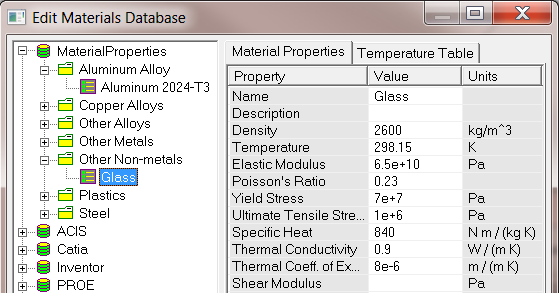 SimWise searches for material files in two user specified directories where the idea is that one directory can be used for properties shared with all users in a
company or department and the other for properties local to a specific user. Materials within a material file can be organized into categories for easier access.
The materials property browser will display all the material files found in the two directories, their categories and the actual material properties.
SimWise searches for material files in two user specified directories where the idea is that one directory can be used for properties shared with all users in a
company or department and the other for properties local to a specific user. Materials within a material file can be organized into categories for easier access.
The materials property browser will display all the material files found in the two directories, their categories and the actual material properties.
Properties can be imported from SOLDIWORKS materials files, Autodesk Simulation Material files, and other systems whose underlying schema is MATML. These include SpaceClaim, ANSYS and Engineers Tool Box. Material files downloaded from MatWeb can also be imported.
Materials can also be created when a CAD file is opened by FILE OPEN or when one of the CAD plug-ins are used to transfer a model to SimWise. If material properties from the CAD system are present at the transfer, SimWise will search through the open materials libraries and try to find a material with the same properties as is being transferred. If it finds one, it will use it. If one is not found, SimWise will create a material in a local material database named the same as the source CAD system. For example if a Solid Edge file is opened via FILE OPEN and material properties are defined for the Solid Edge part and SimWise is unable to find a matching material in one of its material libraries, it will look for a local material library named SolidEdge and create the material in that material library. if it does not find a material library named SolidEdge, it will create it.
Improved handling of imported CAD files
Improvements have been made in processing file from CAD systems opened via FILE OPEN. Colors and transparencies are more widely supported ad improvements have been made in the processing of CAD part and assembly names and in producing a better reproduction of the CAD assembly structure. As mentioned above, Material Properties can be transferred to SimWise from the CAD system if they are available.
Improved SOLIDWORKS and Solid Edge CAD plug-ins
Previously the SOLIDWORKS and Solid Edge plug-ins exported parts in Parasolids format and then translated the Parasolids file to SimWise resulting in a two-step translation process. In V9.7 the part files are converted directly, if possible, without the intermediate Parasolid step. In previous verisons the plug-ins exported each part file, even if there were multiple instances of the same part in the assembly. In V9.7 a part is only exported once and multiple instances merely result in multiple references in the SimWise model. These two improvements have resulted in up to an 80% reduction is translation time.
New Meter Display Options
Meters can now be displayed inside of the graphics window. Previously meter windows were treated the same as a graphic window and when the windows were tiled, meters and graphic windows were placed next to each other. With multiple models open, this could be confusing. This behavior is still maintained but a new option is available to overlay meter windows on top of the graphics window.
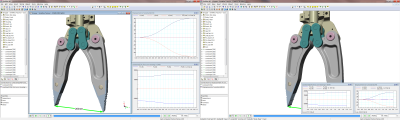
The image on the left is the old behavior and on the right is the overlay option.
Notification when updates are available.
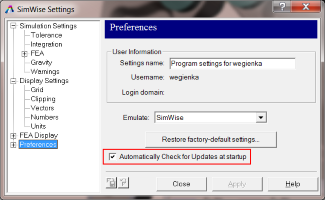
V9.7 introduces an automatic update notification system. If the version you are using is eligible ot be upgraded and a new version becomes available, SimWise will
notify you via the Windows notification area that a new version is available. You will still need to download and install it as was previously done. You can dispable
automatic checking by clearing the checkbox on the Settings dialog, under the Preferences branch.
SimWise Durability
A new add-on module for SimWise is available that performs fatigue-life calculations. SimWise Durability uses the stress and strain results calculated from a Motion + FEA analysis and calculates the number of cycles until failure providing an extimate of the part life. More informaton about SimWise Durability can be found here.
CAD Reader supported versions
SimWise supports loading (via the FILE OPEN command) the following files types:
| System | File Type | Supported Versions |
|---|---|---|
| Catia V5 | .catproduct, .catpart | R6 - R25 (V5-6 R2015) |
| Catia V6 | .catproduct, .catpart | Up to V6R2015) |
| NX | .prt | 11 - NX 10 |
| Pro/E /Creo | .prt, .prt.*, .asm, .asm.* | 16 - Creo 3.0 |
| Solid Edge | .par, .asm | V18 - ST7 |
| SolidWorks | .sldprt, .sldasm | 98 - 2015 |
| Inventor | .ipt, .iam | V6 - V2015 |
| ACIS | .sat, .sab | R1-R25 |
| Parasolids | .x_t, .xmt_txt, .x_b, .xmt_bin | 10.0 - 27.* |
| STEP | .stp, .step | 203, 214 |
| IGES | .igs, .iges | Up to 5.3 |
| STL | .stl |
Version 9.5.0 Build: 1485
Version 9.5.0 is major update to SimWise
New Finite Element Mesher
The Finite Element Mesher has been extensively revised resulting in higher performance and increased robustness.
Parameters changes – The Force all features to mesh and Refine based on element quality options in the Body FEA property page have been removed as they are not relevant to the revised mesh generator.
A new option, Growth Rate, has been added to the Body FEA property page. The growth rate governs the rate at which the size of adjacent elements can grow. The ratio of edge lengths of unconstrained adjacent elements will not exceed the specified growth rate. The default value is 5, which can result in longer, skinnier elements.
Changes to Optimization
Goals and Constraints - The options for setting optimization goals and constraints have been considerably extended. Previously only quantities displayed on meters could be used as goals and constraints. Now, in addition to meters, properties of bodies, constraints, coords, parameters, and formulas can be specified directly without first having to define a meter to display the desired quantity. The Goals page in the Optimization Manager has been substantially revised.
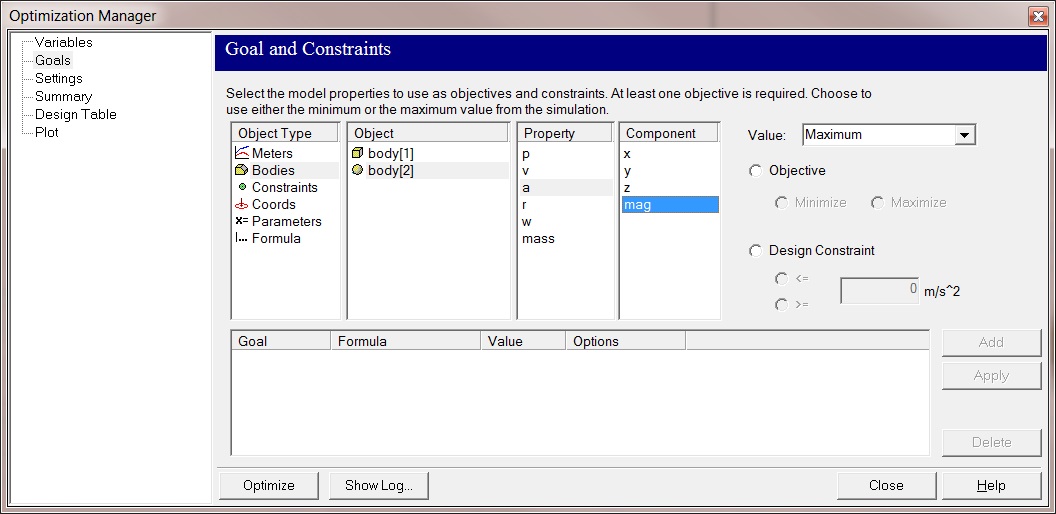
CAD Parameters – Dimensional and other parameters from SolidWorks, Solid Edge, SpaceClaim and Geomagic Design can now be transferred to SimWise and used as Variables in optimization. Autodesk Inventor does not currently support this feature, but it will be added in a future version of SimWise. Each system has its own unique way of dealing with parameters and is discussed separately in the SimWise documentation.
If a CAD parameter is used in an optimization study, the CAD system will be asked to update the dimensions used in the study while the optimization is running.
Support for 3DConnexion SpaceMouse
SimWise now supports the 3DConnexion SpaceMouse family of devices. If the device is plugged and the driver active when SimWise starts the SpaceMouse can be used at any time to pan, zoom, or rotate the SimWise view. The mouse can be configured in the SimWise Settings dialog box under Preferences 3D Mouse which has the following options:
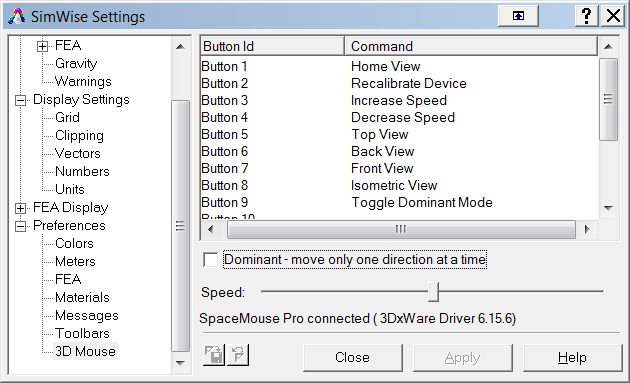
If your SpaceMouse has programmable buttons, they may be programmed from this dialog box.
Changes to CAD Plug-Ins
New CAD Plug-In – A plug-in for Geomagic Design is included with this release. If the SimWise installer detects that Geomagic Design is installed on your system, it will present the option to install the plug-in.
Changes to existing Plug-Ins – In addition to the support for transferring dimensions and variables to SimWise, the Solid Works, SolidEdge, SpaceClaim and Geomagic Design plug-ins now transfer persistent references to the CAD topology. This allows SimWise objects like coords, loads and restraints to be attached to faces, edges and verticies and maintain that reference through an update of the CAD model that may markedly change the original topology.
The plug-in for AutoDesk Inventor does not yet support persistent references or the transfer of CAD dimensions and parameters. This support is planned for a future release of SimWise.
CAD Reader Changes
The CAD readers are accessed via the FILE OPEN command in SimWise.
New CAD Reader – Solid Edge parts and assemblies may now be opened.
Changes to existing Readers – The CAD readers have all been enhanced to support the following functions:
- Hierarchy – The readers now reflect the hierarchy found in the CAD model. Parts and subassemblies as found in the CAD system are reproduced in SimWise.
- Name – Actual part names are transferred when they are available in the CAD file.
- Color and Transparency - Actual part colors and transparencies are transferred when they are available in the CAD file.
- Units – The units from the CAD file are transferred to SimWise. No longer do you need to choose the units as part of the File Open process.
Changes to the File Open Dialog Box – The File Open dialog box now supports additional options:

A log file is always created when SimWise transfers models from other formats. Normally if the transfer is successful, the log file is automatically deleted. Now you can choose to Keep the log file and/or to view the log file upon completion of the transfer.
CAD Reader supported versions
SimWise supports loading (via the FILE OPEN command) the following files types:
| System | File Type | Supported Versions |
|---|---|---|
| Catia V5 | .catproduct, .catpart | R6 - R23 (V5-6 R2013) |
| NX | .prt | 11 - NX 9 |
| Pro/E /Creo | .prt, .prt.*, .asm, .asm.* | 16 - Creo 2.0 |
| Solid Edge | .par, .asm | V18 - ST6 |
| SolidWorks | .sldprt, .sldasm | 98 - 2014 |
| Inventor | .ipt, .iam | V6 - V2014 |
| ACIS | .sat, .sab | R1-R24 |
| Parasolids | .x_t, .xmt_txt, .x_b, .xmt_bin | 10.0 - 26.0.151 |
| STEP | .stp, .step | 203, 214 |
| IGES | .igs, .iges | Up to 5.3 |
| STL | .stl |
Other Changes
Export ACIS change – The Export ACIS File dialog box now allows you to specify the ACIS version of the exported file.
API Changes – Body Object
The Body object has the following new properties and methods.
Properties
Boolean ShowFEA – Retrieves or sets the Body’s Show FEA attribute. If True and an FEA model exists, the FEA mesh will be displayed. If False, the FEA mesh will be hidden.
double GrowthRate - Retrieves or sets the Body’s Growth Rate parameter for the FEA Mesh generator.
Variant WorldTransform – Retrieves the Body’s transformation matrix (4x4) in world coordinates. This is what can be specified on the Body’s World Pos property page.
Variant Transform – Retrieves the Body’s transformation matrix (4x4) relative to its container. This is what can be specified on the Body’s Pos property page. If the body is at the top level of the assembly then this transform is the same as returned by WorldTransform. If the body is in a subassembly then this transform is relative to the sub assembly’s transform.
Variant CM – Retrieves the Body’s center of mass in body coordinates.
Variant Inertias – Retrieves the Body’s Principal Moments of Inertia.
Methods
void ExportSTL(stlfilename) – Exports the body as an STL File to the file named stlfilename. The STL file is generated from the current location of the body.
void ExportSTLwrtCM(stlfilename) – Exports the body as an STL File to the file named stlfilename. The STL file is generated with the body’s origin being located at its center of mass and its orientation being aligned with its principal inertial axes.
API Changes – Coord Object
The Coord object has the following new properties.
Properties
Variant WorldTransform – Retrieves the Coord’s transformation matrix (4x4) in world coordinates. This is what can be specified on the Coord’s World Pos property page.
Variant Transform – Retrieves the Coord’s transformation matrix (4x4) relative to the part it is attached to. This is what can be specified on the Coord’s Pos property page.
API Changes – Constraint Object
The Constraint object has the following new properties.
Properties
long ActuatorType – If the constraint is an actuator, this property returns its type. The return value is one of the following constants wmActuatorForce, wmActuatorPosition, wmActuatorVelocity, or wmActuatorAcceleration.
long MotorType – If the constraint is a motor, this property returns its type. The return value is one of the following constants wmMotorTorque, wmMotorRotation, wmMotorVelocity, or wmMotorAcceleration.
Licensing
If you are currently using V8.x, or V9.0 and you upgrade to V9.5, you will need to reactivate your software and thereby obtain a V9.5 license. If you are using a nodelocked version of SimWise you can use V8.x, V9.0 and V9.5 on the same machine (although only one may be installed at a time). If you want to do this, you must make sure you are using at least V8.6 because earlier versions will not activate correctly.
If you are using a network license, you may support clients that are a mixture of V9.5, V9.0 and V8.x as long as you do the following:
- Your 8.x clients must be running V8.6, not prior versions.
- You must reactive your network license to update it to a V9.5 license. Please consult the installation guide that was installed with the network license manager.
Bug Fixes
| CR | Description |
|---|---|
| 8703 | Torque units incorrect in Goals and Constraints in Optimization Manager |
| 8186 | SpaceClaim sub assemblies and parts have same name/model hierarchy in SimWise |
| 4092 | Update from CAD not available in models linked to Space Claim |
| 7153 | Extra bodies in this ProE assembly file |
| 6639 | Incorrect FEA results with some models using gravity |
| 4210 | Stop button is not reliable when running a combined Motion + FEA Simulation |
| 6177 | FEA meter not displaying correct z value |
| 9332 | Total Force / Face Normal load not producing correct results |
| 9373 | Convection boundary condition not working correctly |
| 9265 | Thermal analysis (with bond) will not solve |
| 9297 | Total Force causing (residual) constant acceleration |
Version 9.0.5 Build: 1321
Version 9.0.5 is a bug fix update to SimWise
Bug Fixes
- Problem opening Pro/Engineer parts and assemblies have been resolved.
- A new method has been added to the API for the body object that returns Inertia values. (CR7600)
- A crash caused by Polylines with redundant verticies used for extruded bodies was fixed. (CR7590)
- A problem running optimizations has been resolved. (CR7506)
Version 9.0.0 Build: 1157
Version 9.0.0 is major update to SimWise
New Optimization Capabilities
The major enhancement in V9.0 is the inclusion of Optimization in SimWise 4D. Using the HEEDS optimization from Red Cedar Technologies, most parameters can in a SimWise model can be used as optimization variables while any quanitity displayed on a meter can serve as either a value to be optimized or a constraint on the optimization process. A new menu command Tools->Optimize Model... accesses the optimization manager where all the necessary information for an optimization can be defined and the actual optimization process can be run.
There is a new section in the on-line help file that addresses optimizaiton and a new tutorial in the tutorial guide that walks through the entire process, step by step.
Parameters
One of the enhancements required to support optimization was the development of a new parameter object that functions like a Slider but without the ability to be changed while a simulation is running. Almost every value that accepts a number can now be assigned a parameter instead of an actual numeric value. A new section on defining and usign these parameters has been added to the on-lin help.
Bug Fixes
- A performance issue with the display of clipping planes has been addressed.
- The installer now detects if there is another version of SimWise installed on the machine. If so, it offer the opportunity to uninstall before proceeding with the installation. You should not install more than one version of SimWise on a single machine.
- A crash caused by rescaling acceleration vectors has been fixed.
- The ability to update a Solid Edge model from within SimWise has been fixed.
- Improvements have been made in reading IGES files that constain surfaces that encompass a solid body.
- Improvements have been made with the NX file reader.
- Previously exporting from Solidworks using the SimWise add-in would cause all the Part files in the SolidWorks assembly to be opened. These files are no longer being opened.
- Nested subassemblies in SpaceClaim are now being translated correctly.
Licensing
If you are currently using V8.x and you upgrade to V9.0, you will need to reactivate your software and thereby obtain a V9.0 license. If you are using a nodelocked version of SimWise you can use V8.x and V9.0 on the same machine (although only one may be installed at a time). If you want to do this, you must make sure you are using V8.6 because earlier versions will not activate correctly.
If you are using a network license, you may support clients that are a mixture of V9.0 and V8.x as long as you do the following:
- Your r8.x clients must be running V8.6, not prior versions.
- You must reactive your network license to update it to a V9.0 license. Please consult the installation guide that was installed with the network license manager.
Direct CAD File Readers
SimWise now supports loading (via the FILE OPEN command) the following files types:
| System | File Type | Supported Versions |
|---|---|---|
| Catia V5 | .catproduct, .catpart | R6 - R22 (V5-6 R2012) |
| NX | .prt | 11 - NX 8 |
| Creo/Elements formerly Pro/E | .prt, .prt.*, .asm, .asm.* | 16 - Creo 2.0 |
| SolidWorks | .sldprt, .sldasm | 98 - 2013 |
| Inventor | .ipt, .iam | V6 - V2013 |
| ACIS | .sat, .sab | R1-R23 |
| Parasolids | .x_t, .xmt_txt, .x_b, .xmt_bin | 10.0 - 24.0 |
| STEP | .stp, .step | 203, 214 |
| IGES | .igs, .iges | Up to 5.3 |
| STL | .stl |
Version 8.6.0 Build: 1152
Version 8.6.0 is minor upgrade to V8.5
V8.6 is the final update to V8.x. The next release will be V9.0. V8.6 is required if you want to be able to run a mixed installation of V8 and V9 in a network license environment or if you want to be able to have both V8 and V9 on the same machine in a nodelocked enviroment.
Bug Fixes
- A problem with incorrect FEA results being displayed on models that are placed in a rotated configuration has been resolved.
- Online help is accessible from the HELP menu in SimWise FEA and SimWise Motion
- Issues with the import of some Parasolids files have been fixed.
- The interface between SimWise and Simulink has significantly improved performance while a Simulink simulation is running.
- SimWise will offer to emulate SolidWorks, Solid Edge or Autodesk Inventor if it detects that these CAD systems are installed on the same machine as SimWise.
- Excel send and received fields are now displayed correctly in the Japanese version of SimWise
- Previous release notes have indicated that the SimWise Parasolid translator can read Parasolid versions 10.0-24.0. This is incorrect. The Parasolid translator can read Parasolid versions 14.0-25.0.155
Version 8.5.2 Build: 1083
Version 8.5.2 is minor upgrade to V8.5 with the following changes:
Bug Fixes
A problem caused by initiating an update from within SimWise of a SolidWorks model has been fixed.
An issue with incorrect FEA results being returned from a model with symmetric restraints has been fixed.
Version 8.5.1 Build: 1059
Version 8.5.1 is minor upgrade to V8.5 with the following changes:
SpaceClaim Interface
V8.5,1 provides a new data translator add-in for SpaceClaim which provides associative transfer of geometry and constraints from SpaceClaim to SimWise. The interface does not yet allow updating from with SimWise. Updates must be initiated from within SpaceClaim. This capability will be added in a future release.
CAD Translators
This version contains updated versions of the CAD file readers that operate from within SimWise. They allow assemblies created in SolidWorks 2013 and Inventor 2013 to be loaded into SimWise.
SimWise now supports loading (via the FILE OPEN command) the following files types:
| System | File Type | Supported Versions |
|---|---|---|
| Catia V5 | .catproduct, .catpart | R6 - R22 (V5-6 R2012) |
| NX | .prt | 11 - NX 8 |
| Creo/Elements formerly Pro/E | .prt, .prt.*, .asm, .asm.* | 16 - Creo 2.0 |
| SolidWorks | .sldprt, .sldasm | 98 - 2013 |
| Inventor | .ipt, .iam | V6 - V2013 |
| ACIS | .sat, .sab | R1-R23 |
| Parasolids | .x_t, .xmt_txt, .x_b, .xmt_bin | 10.0 - 24.0 |
| STEP | .stp, .step | 203, 214 |
| IGES | .igs, .iges | Up to 5.3 |
| STL | .stl |
Bug Fixes
The 64-bit Link to Excel has been fixed to use a new grid control.
The ability to initiate an update to models transferred via the Add-in from SolidWorks and Solid Edge has been fixed.
Version 8.5.0 Build: 1056
Version 8.5 is a major upgrade to SimWise with the following being new or significantly enhanced features:
64-Bit Version
SimWise is now available in a 32 and 64-bit versions. If you are installing on a machine running 64-bit Windows, you will be offer the chance to install either the 32 or the 64 bit version of the product. The 64-bit version will use all of the available memory in your computer allowing much larger FEA models to be meshed and solver than were possible on the 32-bit version, which caps memory usage at 3GB.
The 64-bit version can still interface with 32-bit versions of SolidWorks, Solid Edge, Inventor and Matlab/Simulink just as the 32-bit version of SimWise can integrate with the 64-bit versions of those products.
DST recommends that if you are using a 64-bit version of Windows, you should consider installing the 64-bit version of SimWise.
CAD Integration
V8.5 provides a new data translator add-in for Solid Edge which provides associative transfer of geometry and constraints from Solid Edge to SimWise. It also contains new CAD file readers that operate from within SimWise and increase the CAD systems from which SimWise can directly transfer geometric data.
Solid Edge
If the SimWise installer detects that Solid Edge is installed it will offer the opportunity to install the Solid Edge data translator plug-in. This is a Solid Edge add-in, available for 32 and 64 bit versions of Solid Edge, that is activated from with Solid Edge and transfers assemblies, parts and constraints directly into SimWise. It also allows updates to an existing SimWise model that was translated from a Solid Edge assembly to be performed. Only the parts that were changed in the Solid Edge assembly are updated in the SimWise model.
Direct CAD File Readers
SimWise now supports loading (via the FILE OPEN command) the following files types:
| System | File Type | Supported Versions |
|---|---|---|
| Catia V5 | .catproduct, .catpart | R6 - R22 (V5-6 R2012) |
| NX | .prt | 11 - NX 8 |
| Creo/Elements formerly Pro/E | .prt, .prt.*, .asm, .asm.* | 16 - Creo 2.0 |
| SolidWorks | .sldprt, .sldasm | 98 - 2012 |
| Inventor | .ipt, .iam | V6 - V2012 |
| ACIS | .sat, .sab | R1-R23 |
| Parasolids | .x_t, .xmt_txt, .x_b, .xmt_bin | 10.0 - 24.0 |
| STEP | .stp, .step | 203, 214 |
| IGES | .igs, .iges | Up to 5.3 |
| STL | .stl |
Change in behavior for SolidWorks and Inventor file readers - In previous versions of SimWise, attempting to open a SolidWorks or Inventor file from within SimWise caused the CAD application to be started, the desired file opened, and the SimWise CAD add-in activated to transfer the CAD data to SimWise. V8.5 changes this behavior such that attempting to open a SolidWorks or Inventor file from within SimWise will directly open the file and transfer the data without having to start the CAD system. This means that SolidWorks and Inventor files can be open on systems that do not have these CAD packages installed. It also means that CAD constraints are NOT converted to SimWise constraints, only geometry is converted. To transfer constraints along with the geometry, the data translation has to be initiated from within the CAD system using the SimWise CAD system add-in.
Finite Element Solver
The SimWise FEA solver has been significantly enhanced. Previously SimWise used two FEA solvers, a fast, iterative solver that was used for Stress analyses and a separate solver used for all other types. The fast, iterative solver has been enhanced to provide all the analyses types supported by SimWise. Additional enhancements to the solver result in better use of multi-core processor and reduced solutions times.
Data Translation API
The CAD import capabilities of SimWise are now exposed for general use via an API. This is the same API DTST uses to write the CAD interfaces it supports. Documentation and sample files can be found in the SDK/Export API directory.
Windows 8
SimWise can run under Windows 8.


