
News
About Design Simulation Technologies
Design Simulation Technologies Releases Working Model 2D Version 10
Working Model 2D Version 10 adds AI assistant integration, letting students and faculty create physics simulations through natural language — no manual setup required
(Canton, MI) – February 25, 2026 – DST (Design Simulation Technologies, Inc.; www.design-simulation.com), today announced the release of Working Model 2D Version 10, the most significant update in the product’s thirty-year history. Version 10 introduces an AI assistant that builds simulations from natural language descriptions, a completely redesigned user interface, and a new COM/Python programming API that opens the simulation engine to external automation for the first time.
Working Model 2D is the world’s most widely used software for 2D kinematic and dynamic simulation. Used by engineers at organizations including NASA’s Jet Propulsion Laboratory, and adopted by colleges and universities on six continents, it enables users to build mechanical systems on screen, run real-time physics simulations, and measure forces, velocities, and accelerations on any body or joint.
AI Assistant Integration
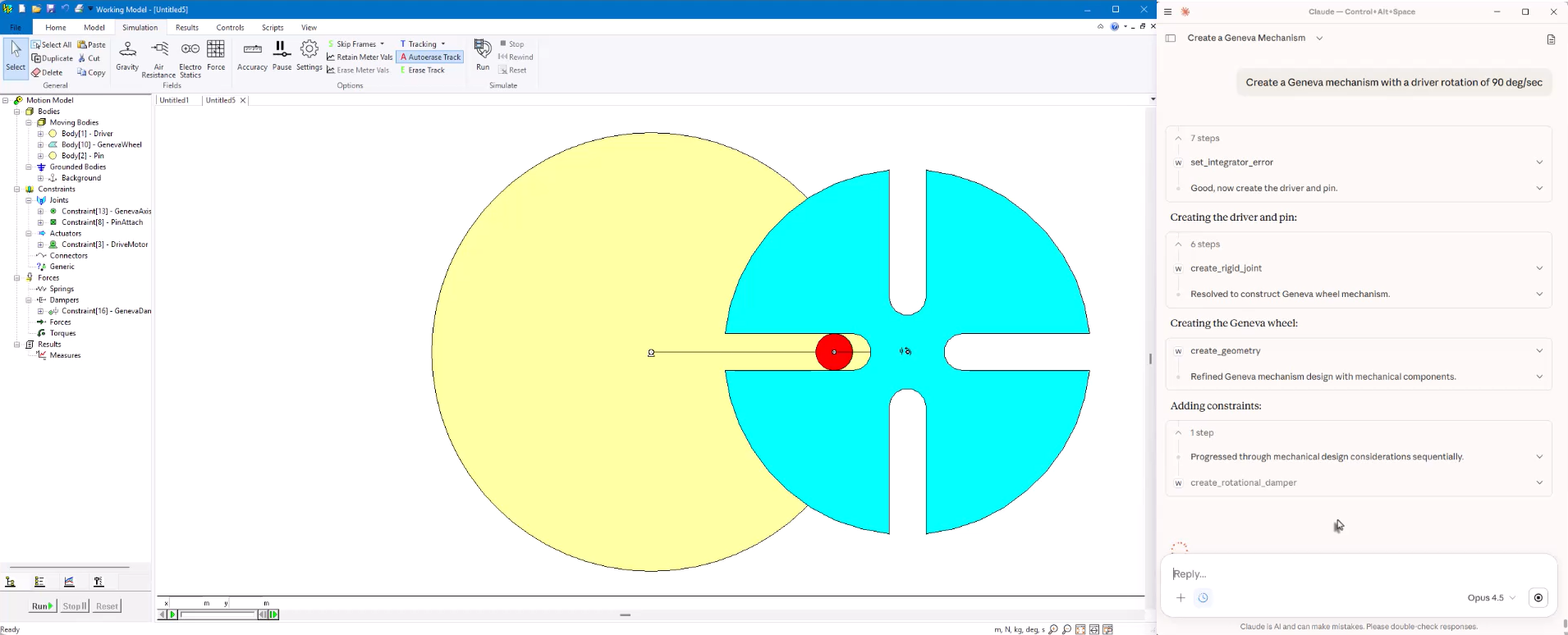
The headline feature of Version 10 is an AI assistant that communicates directly with the simulation engine through the Model Context Protocol (MCP). Users can describe a mechanism in plain English — for example, "Build a slider-crank with a 5 cm crank and a 15 cm connecting rod" — and the AI creates the bodies, adds the joints, attaches a motor, and runs the simulation automatically.
The AI assistant can also interpret hand-drawn sketches. Users photograph a mechanism sketch, upload it, and the AI identifies the links, joints, and approximate dimensions to build a working simulation. This sketch-to-simulation workflow is especially valuable in educational settings, where students can go from a pencil drawing to a running simulation in seconds.
"The AI doesn’t replace the engineer\’s judgment or the educator’s teaching," said Alan Wegienka, president of Design Simulation Technologies. "What it does is eliminate the tedious setup work — the clicking and configuring — so you can focus on what actually matters: understanding the physics, analyzing the results, and refining your design."
Improved User Interface
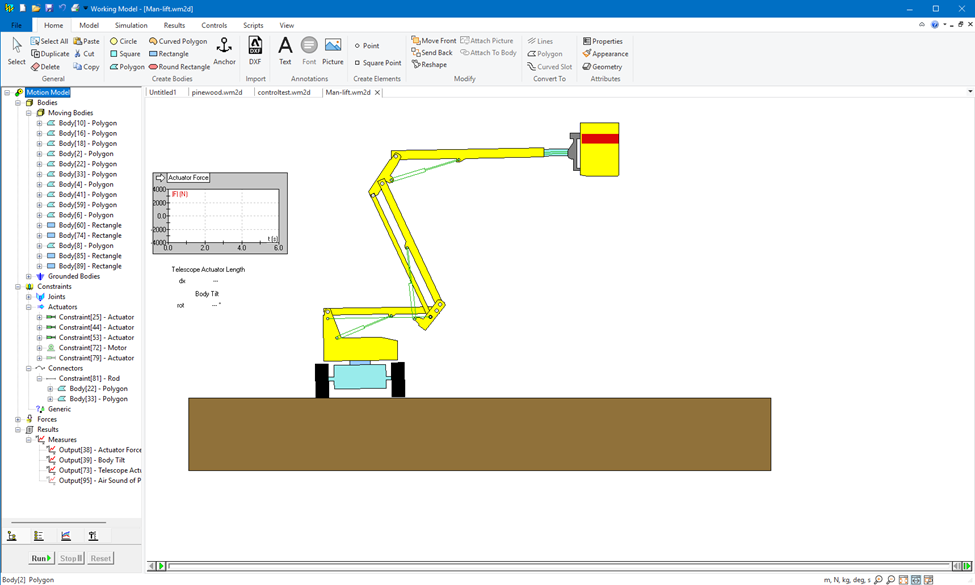
Version 10 replaces the classic menu-and-toolbar interface with a modern design organized across seven task-specific tabs: Home, Model, Simulation, Results, Controls, Scripts, and View. A new browser panel on the left side of the workspace provides a hierarchical view of the entire model, with four tabs for browsing bodies, annotations, measurements, and input controls. Every item supports right-click context menus for quick access to relevant commands.
New Programming API
Previous versions of Working Model could only be scripted through WM Basic. Version 10 introduces a full COM automation interface, making the simulation engine accessible from C++, C#, Visual Basic, and VBScript. Dedicated Python bindings are included out of the box, enabling users to write Python scripts that create models, run parametric studies, extract data, and automate entire simulation workflows. The new API is the same interface that powers the AI assistant, and it is fully available for users’ own programs and scripts.
Built-in Script Editors
Version 10 includes integrated code editors for both Python and VBScript directly inside the application. The editors provide syntax highlighting, automatic indentation, line numbering, and error highlighting, allowing users to write, test, and refine automation scripts without leaving Working Model.
External Interfaces and Simulink Co-Simulation
Version 10 adds direct, real-time data exchange interfaces to Excel, MATLAB, Python, and user-written DLLs. Simulation data flows out to these external tools during a running simulation, and computed results feed back as forces, torques, or actuator commands — all in real time. For control system engineers, Working Model 2D can now function as a plant model for Simulink, enabling full co-simulation between control logic and the mechanical system.
Availability
Working Model 2D Version 10 is available immediately. Free evaluation copies can be downloaded at www.design-simulation.com. Existing customers with active maintenance agreements are eligible for a free upgrade. Volume and academic licensing is available.
About DST
DST develops physics-based simulation software. The company's products are used by engineering professionals to build and test virtual models of their mechanical designs, and by STEM educators and students in the classroom to teach and learn about physics and engineering kinematics, dynamics, and machine design.
With DST's SimWise 4D, Working Model 2D, and Dynamic Designer products, users evaluate design performance by conducting complete, accurate simulations. Engineers, professors and students can quickly perform "what-if" analyses, find and correct design problems, plus refine and validate designs without the need for physical prototypes.
Students in high school and college use Interactive Physics, DST's award-winning educational software, to explore and understand the physical world through simulation.
DST develops, markets, and supports these software tools for commercial and academic users worldwide. Selected DST products are available from leading CAD suppliers and CAE resellers. Learn more by visiting the DST website at www.design-simulation.com.


