
Working Model 2D
2D Dynamic Motion Simulation
New Capabilities in Working Model 2D Version 10
Working Model 2D V10 represents the most significant update in the product's history, introducing a modernized interface, powerful scripting capabilities, and seamless integration with external tools and AI assistants.
AI Assistant Integration
Working Model 2D V10 introduces groundbreaking integration with AI assistants, transforming how you interact with the software.
From Idea to Simulation in Minutes
Traditional CAD and simulation workflows require you to translate your engineering ideas into specific software commands—creating bodies one at a time, selecting joint types from menus, entering coordinates, and configuring properties. This process works, but it puts the software between you and your thinking.
With AI integration, that barrier disappears. Describe what you want to build in plain English: "Create a four-bar linkage with a 2:1 input-output ratio" or "Add a cam that drives a follower with 20mm of travel." The AI understands your intent and builds the corresponding mechanism in Working Model, ready to simulate.
You can even sketch a mechanism by hand, take a photo, and let the AI interpret your drawing—transforming a napkin sketch into a functioning simulation model. This means you can go from an initial concept to running simulation in minutes rather than hours.
Focus on Engineering, Not Software
The goal is simple: spend less time operating software and more time solving problems. Whether you're a student learning how mechanisms work, an engineer exploring design alternatives, or a researcher testing hypotheses, this integration lets you work at the speed of your ideas.
Iterate quickly by describing changes in natural language. Ask questions about your model's behavior. Let the AI handle the repetitive setup work while you focus on the engineering decisions that matter.
New Ribbon Bar User Interface
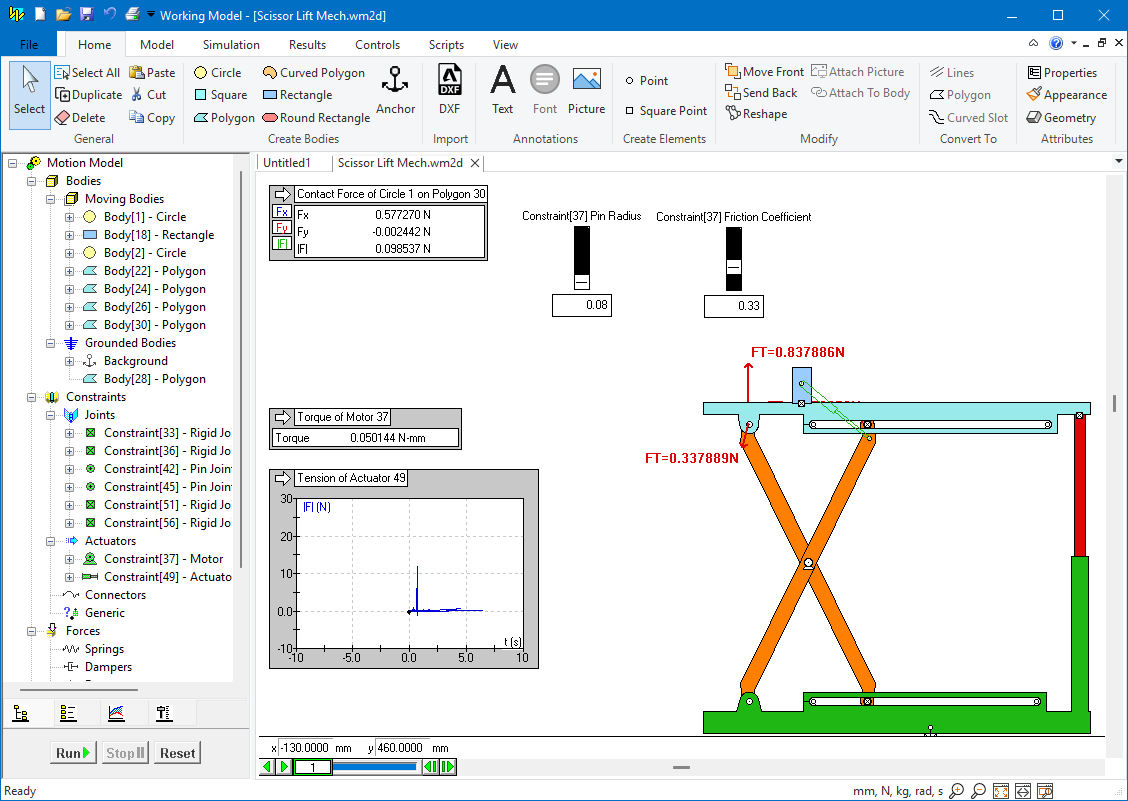
Working Model 2D V10 features a completely redesigned ribbon bar interface that brings the software in line with modern application standards. The ribbon organizes tools and commands into logical groups, making it easier to find the features you need without navigating through multiple menu levels.
The contextual ribbon tabs adapt to your current task, presenting relevant tools when you're creating bodies, defining constraints, running simulations, or analyzing results. Frequently used commands are always just one click away, streamlining your workflow and reducing the time spent searching for tools.
New Model Browser
The new Model Browser provides a hierarchical view of your entire simulation model in a dockable panel. Every body, constraint, motor, spring, and output is listed in an organized tree structure, making it simple to navigate complex models with dozens or even hundreds of components.
Select objects directly from the browser to edit their properties, or use it to quickly locate and modify specific elements without hunting through your model visually. The browser also supports multi-selection, allowing you to change properties on multiple objects simultaneously.
New API
Version 10 introduces a comprehensive API that opens Working Model 2D to automation and integration with other software systems. The API is available through two interfaces:
COM Interface
The COM (Component Object Model) interface allows Working Model 2D to be controlled from any Windows programming language that supports COM automation. This includes VBScript, C++, C#, Visual Basic, and many others. You can create models programmatically, run simulations, extract results, and integrate Working Model into larger engineering workflows.
Python Bindings
Native Python bindings provide direct access to the Working Model API from Python scripts. This makes it easy to leverage Python's extensive scientific computing ecosystem—including NumPy, SciPy, and Matplotlib—alongside your Working Model simulations. Automate parametric studies, post-process results, or build custom analysis tools using familiar Python syntax.
Execution of VBScript and Python Programs
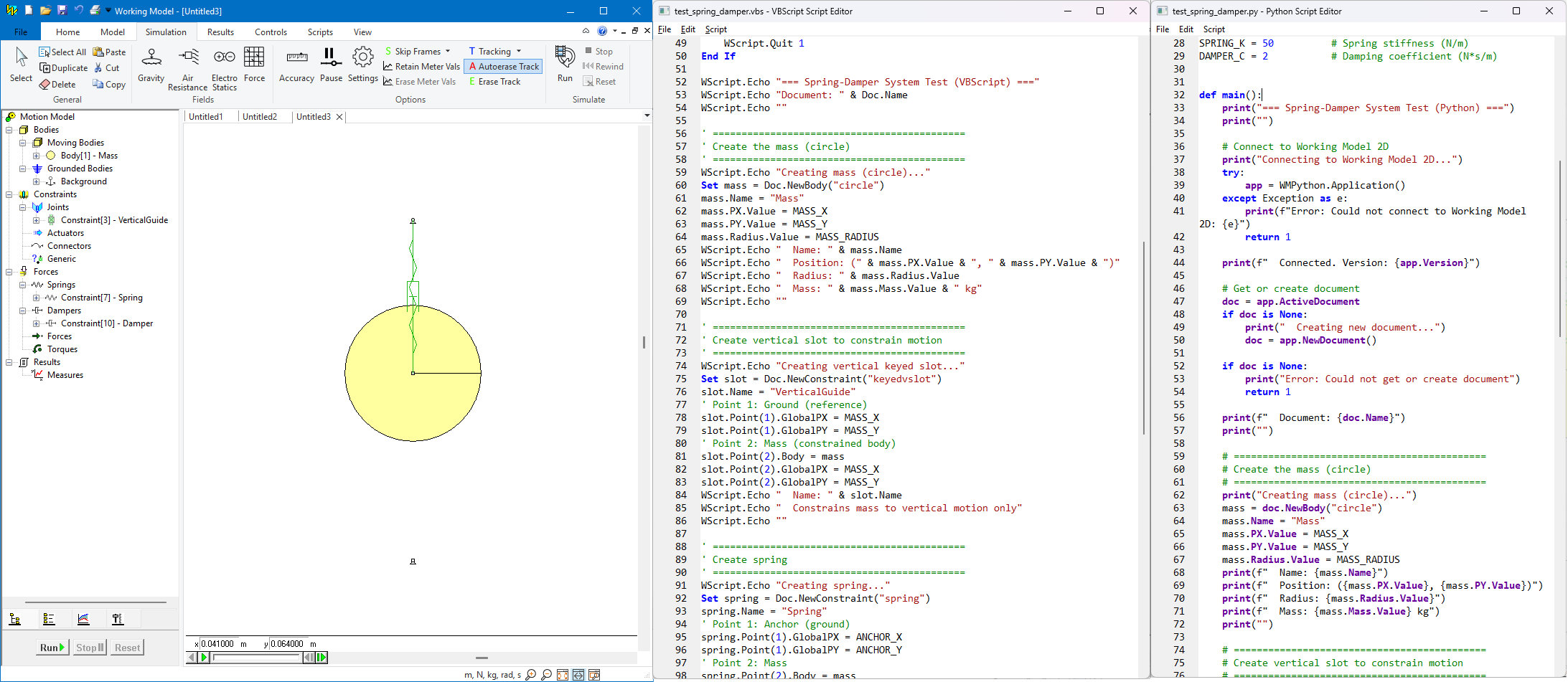
Working Model 2D V10 includes built-in interpreters for both VBScript and Python, eliminating the need for external installations. Run scripts directly within the application to automate repetitive tasks, create custom tools, or extend Working Model's capabilities.
Scripts can interact with your model in real-time—creating objects, modifying properties, running simulations, and processing results—all from within the Working Model environment. This makes it simple to build sophisticated automation without switching between applications.
Built-in Script Editors
Write and edit scripts directly in Working Model using the new built-in code editors for VBScript and Python. The editors include professional features that make script development faster and less error-prone:
- Syntax highlighting with color-coded keywords, strings, and comments
- Automatic indentation for clean, readable code
- Line numbering for easy reference and debugging
- Error highlighting to catch mistakes before running
Whether you're writing a quick automation script or developing a complex custom tool, the integrated editors provide a comfortable coding environment without leaving Working Model.
Direct External Interfaces
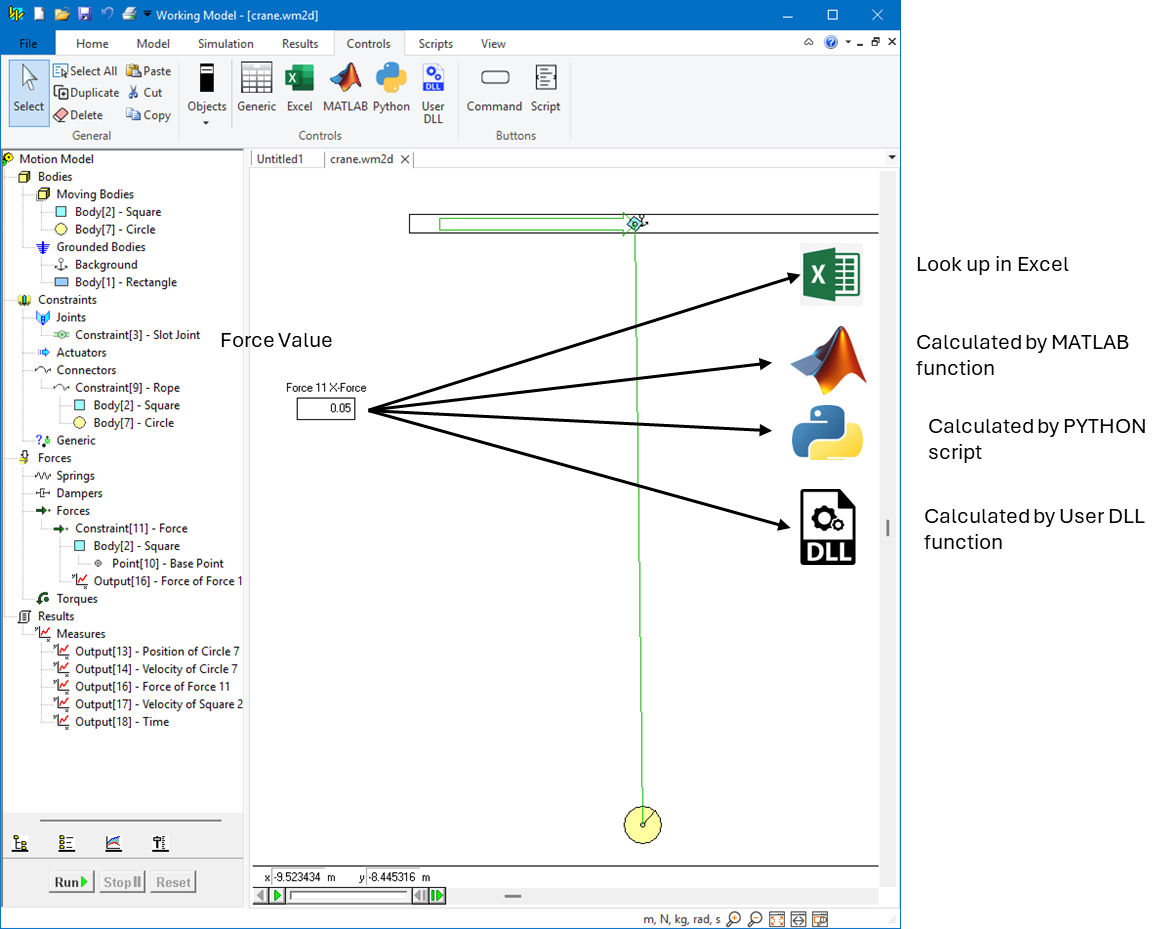
Version 10 dramatically expands Working Model's ability to communicate with external software. New direct interfaces to Excel, MATLAB, Python, and user-written DLLs allow real-time data exchange during simulation.
Functions from these external sources can be assigned to inputs that drive any value in your Working Model simulation. For example, you can:
- Read force values calculated in an Excel spreadsheet
- Call MATLAB functions to compute complex control laws
- Use Python scripts for custom mathematical operations
- Link to proprietary algorithms in user-written DLLs
Values are updated at each simulation step, enabling tight integration between Working Model's dynamics solver and your external calculations.
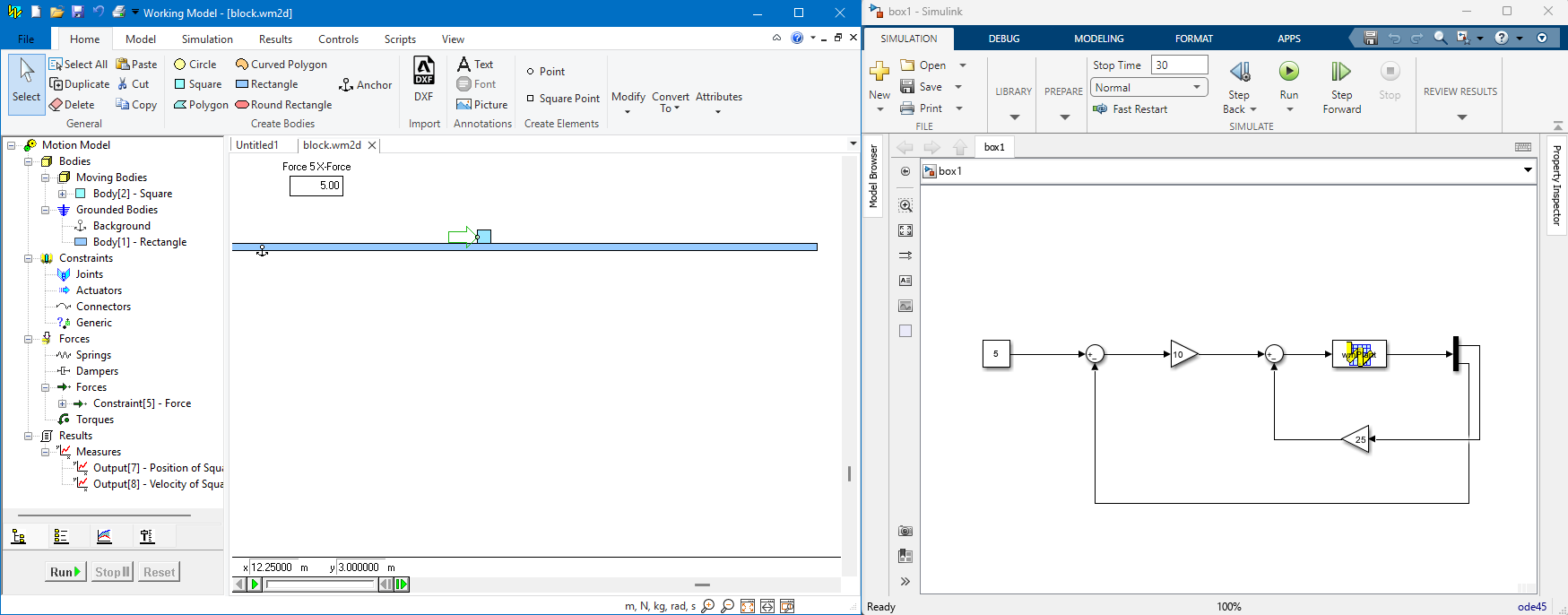
Simulink Co-Simulation
Working Model 2D can now function as a Plant Model for Simulink, enabling powerful co-simulation between the two environments. Design your control systems in Simulink using its extensive block diagram tools, while Working Model handles the mechanical system dynamics.
During co-simulation, the two solvers run together: Simulink sends control signals (motor torques, applied forces) to Working Model, which simulates the mechanical response and returns sensor outputs (positions, velocities, accelerations) back to Simulink. This closed-loop integration lets you:
- Develop and tune controllers for mechanical systems
- Validate control algorithms against realistic dynamics
- Explore the interaction between control and mechanical design
- Test scenarios that would be difficult or expensive to prototype physically
Request to be Notified When V10 is Released
Be among the first to know when Working Model 2D Version 10 becomes available. Enter your information below and we will notify you as soon as it is released.
- Home
- Version 10 Capabilities
- Capabilities
- Purchase
- Questions before Purchase
- Find a Reseller
- Simulations
- Tutorial
- Success Stories
- Educational Case Studies
- Quotes
- Licensing
- Product Videos
- Support Videos
 Quote
Quote Evaluation


