
News
About Design Simulation Technologies
Design Simulation Technologies Releases Interactive Physics Version 10
Interactive Physics Version 10 adds AI assistant integration, letting physics teachers and students create simulations through natural language — no manual setup required
(Canton, MI) – May 21, 2026 – DST (Design Simulation Technologies, Inc.; www.design-simulation.com), today announced the release of Interactive Physics Version 10, the most significant update in the product’s history. Version 10 introduces an AI assistant that builds simulations from natural language descriptions, a completely redesigned user interface offering both Basic and Advanced modes, direct in-application access to the program’s 63 curriculum models and 179 physics experiments, and localization in seven languages.
Interactive Physics is the world’s most widely used educational software for physics simulation. Adopted by high schools, community colleges, and universities on six continents, it allows teachers and students to build mechanical systems on screen, run real-time physics simulations, and measure forces, velocities, accelerations, energy, and momentum on any body or joint — all without writing a single equation.
AI Assistant Integration
The headline feature of Version 10 is an AI assistant that communicates directly with the simulation engine through the Model Context Protocol (MCP). Students and teachers can describe a physics scenario in plain English — for example, “Build a pendulum 30 cm long with a 200 gram bob and graph its kinetic and potential energy” — and the AI creates the bodies, adds the constraints, attaches the meters, and runs the simulation automatically.
The AI assistant can also interpret hand-drawn sketches. Students photograph a sketch from their notebook, upload it, and the AI identifies the bodies, joints, and approximate dimensions to build a working simulation. This sketch-to-simulation workflow is especially valuable in the physics classroom, where students can move from a pencil drawing to a running simulation in seconds and focus their attention on the underlying concepts.
"The AI doesn't replace the teacher or shortcut the learning" said Alan Wegienka, president of Design Simulation Technologies. "What it does is eliminate the tedious setup work — the clicking and configuring — so students can focus on what actually matters: understanding the physics, observing the results, and asking the next question."
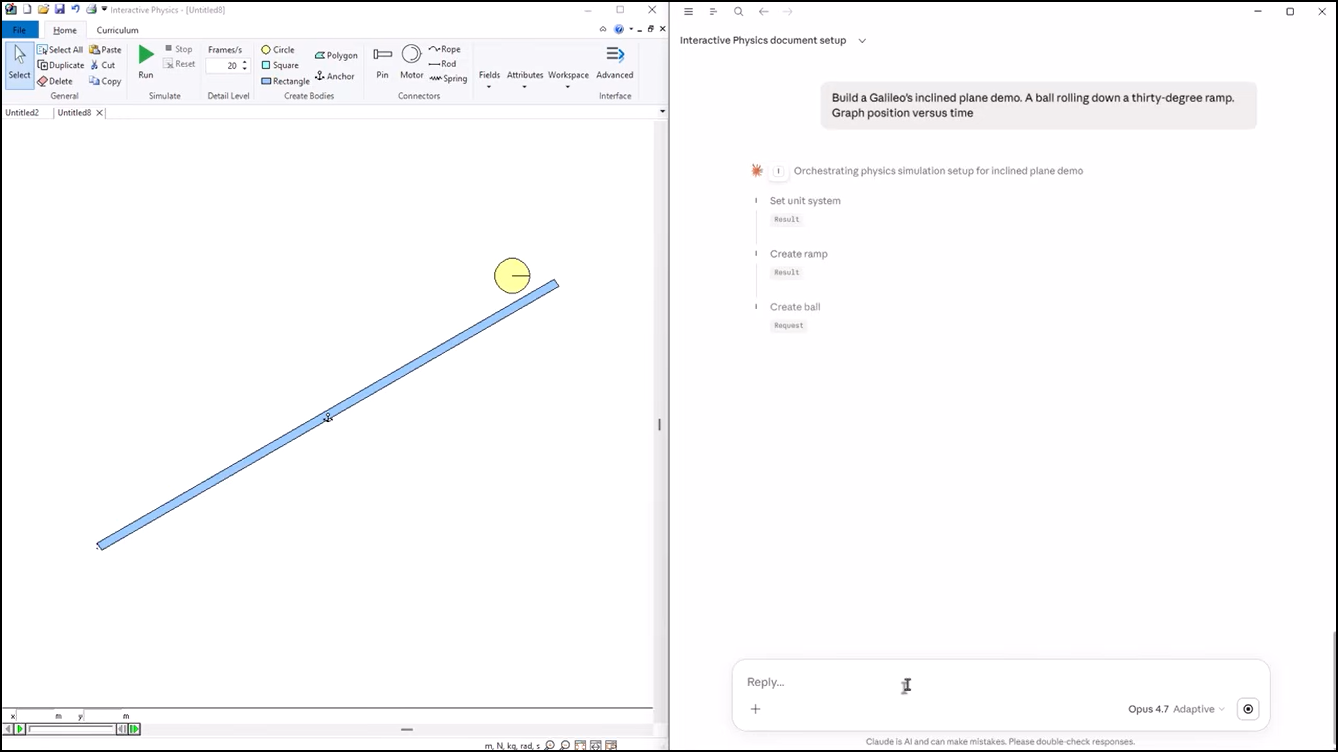
Redesigned User Interface with Basic and Advanced Modes
Version 10 replaces the classic menu-and-toolbar interface with a modern design organized across task-specific tabs. The new interface ships in two configurations: a Basic mode that presents only the tools needed for introductory physics — ideal for high school students and first-time users — and an Advanced mode that exposes the full feature set for college coursework and richer modeling. Teachers can switch modes per student or per assignment, scaling the interface to the level of the course.
The interface also exposes Interactive Physics’ library of educational content directly within the application. All 63 curriculum models — covering mechanics, energy, momentum, oscillations, rotational dynamics, and more — are browsable and openable with a single click from inside the UI, with no need to hunt through file folders. Alongside the curriculum, all 179 physics experiments that ship with the product are likewise available directly from the UI, each ready to run, modify, and assign. Together, these 242 ready-to-use models give teachers a complete in-application library of vetted, classroom-tested content from the moment they launch the program.
Every command in Version 10 is paired with a large, richly formatted HTML tooltip that goes well beyond the one-line hints found in traditional software. Hovering over any tool, menu item, or icon brings up a descriptive panel that explains what the command does, when to use it, and how it fits into a typical simulation workflow — often with formatted text, diagrams, and worked examples embedded directly in the tooltip. The result is a built-in, context-sensitive help system that lets students discover the software on their own and dramatically reduces the learning curve for new teachers adopting Interactive Physics for the first time.
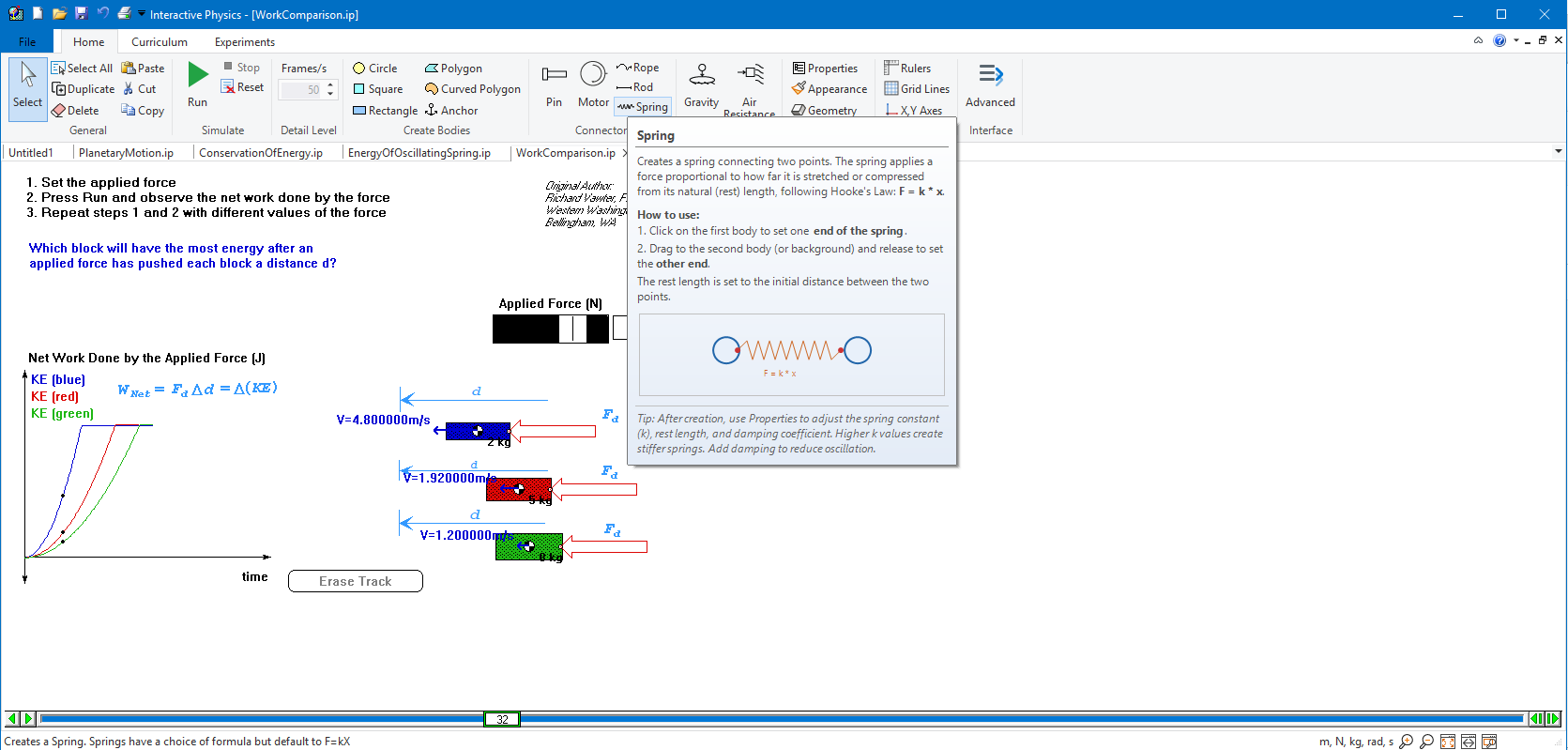
New Programming API
Previous versions of Interactive Physics could only be scripted through IP Basic. Version 10 introduces a full COM automation interface, making the simulation engine accessible from C++, C#, Visual Basic, and VBScript. Dedicated Python bindings are included out of the box, enabling teachers and curriculum developers to write Python scripts that create models, run parametric studies, extract data, and automate entire experiment workflows. The new API is the same interface that powers the AI assistant, and it is fully available for users’ own programs and scripts.
Available in Seven Languages
Interactive Physics Version 10 is fully localized for English, French, German, Italian, Spanish, Portuguese (Brazilian), and Japanese. The user interface, menus, dialogs, error messages, curriculum content, and documentation are all translated, allowing instructors and students worldwide to use the product in their native language.
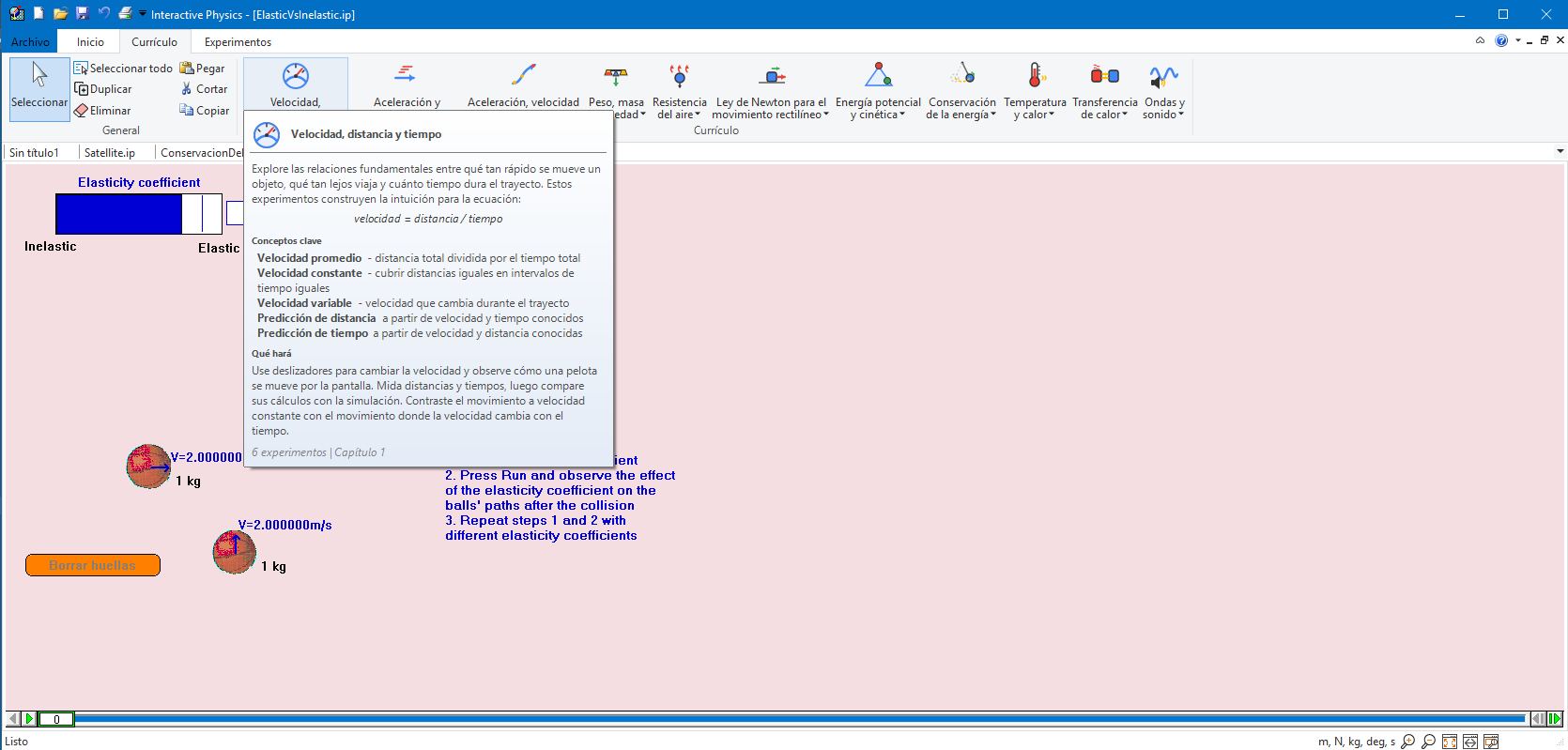
Availability
Interactive Physics Version 10 is available immediately. Free evaluation copies can be downloaded at www.design-simulation.com. Existing customers with active maintenance agreements are eligible for a reduced price upgrade. Volume, academic, and site licensing is available.
About DST
DST develops physics-based simulation software. The company's products are used by engineering professionals to build and test virtual models of their mechanical designs, and by STEM educators and students in the classroom to teach and learn about physics and engineering kinematics, dynamics, and machine design.
With DST's SimWise 4D, Working Model 2D, and Dynamic Designer products, users evaluate design performance by conducting complete, accurate simulations. Engineers, professors, and students can quickly perform “what-if” analyses, find and correct design problems, plus refine and validate designs without the need for physical prototypes.
Students in high school and college use Interactive Physics, DST's award-winning educational software, to explore and understand the physical world through simulation.
DST develops, markets, and supports these software tools for commercial and academic users worldwide. Selected DST products are available from leading CAD suppliers and CAE resellers. Learn more by visiting the DST website at www.design-simulation.com.


