
Dynamic Designer Motion
Motion Simulation embedded in Inventor
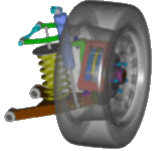
Validate Your Design Inside Autodesk Inventor
The problem with this is that design validation is done too late in the process. Don't Wait to Validate!Dynamic Designer allows you understand the true dynamic function of your design inside the Inventor environment before your produce or assemble physical hardware. Design Validation with Dynamic Designer allows you to build, test and refine the function of your CAD models and output the same performance information typically gathered physically (e.g. part interference, motor size, cam performance, gear and linkage layout, etc.). Using Dynamic Designer you will understand the mechanics of your design before you cut metal or mold plastic, all within the familiar Inventor environment. Design revisions are easier and less costly if motion problems are identified before you build and test a physical assembly. If you have questions about how a design works or performs, Dynamic Designer can help you.
|
|
The Products - Three Levels to Meet Your Needs and Budget |
|
|
The Dynamic Designer product
family consists of: Motion Professional provides you with the complete motion validation functionality required to make sure your designs will work properly before you build them. Motion and Simply Motion are subsets of the Motion Professional product and are used to understand substantial, but limited aspects of a mechanism motion. Regardless of which product you choose, all Dynamic Designer products help you test the function of your mechanism before you build them. The process is simple. From your Inventor assembly, you will create a motion model containing constraints, contacts, forces, and actuators. You will then simulate mechanism motion using the most powerful simulation engine in the world: MSC.ADAMS. Finally, you will review animations, plot engineering data, and check for interferences. All seamlessly inside Inventor. |
|
The Process - Four Easy Steps |
|
|
Regardless of which product you choose, all Dynamic Designer products help you test the function of your mechanisms before you build them.
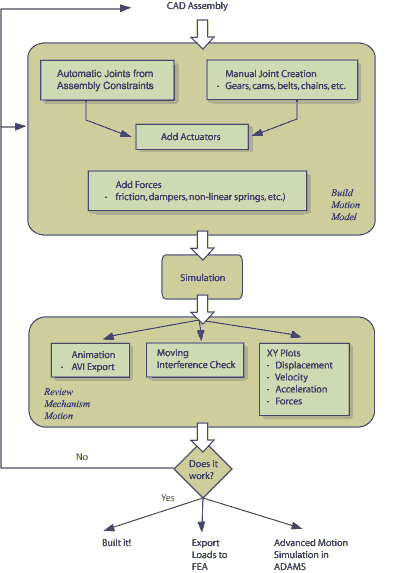
The process involves four simple steps:
Creating a Motion ModelOnce an Inventor assembly is complete, mechanical joints are easily created, either by automatically converting them from your existing assembly constraints using Dynamic Designer’s Automatic Constraint Mapping, or by using the unique Intellimotion builder which walks you through the step-by-step model building process. Adding/Controlling MotionTo make your simulation closely reflect real word functionality, Dynamic Designer allows you to add various motion characteristics to your model. Dynamic Designer supports motors, actuators, gravity, realistic contact between bodies, springs, friction, damping and other generated forces as needed. Running the SimulationRunning a simulation is as simple as specifying how long you want the process to run and then clicking the calculator icon to compute your motion results. Reviewing ResultsDynamic Designer calculates several types of results that you can use to verify the operation of your design. Moving interference animations, AVI and VRML files give you the visual feedback you need to understand if your design will work properly. However, what truly sets Dynamic Designer apart from a general animation package is the ability to provide engineering data associated with the movement of the assembly. Result vectors and plots of displacement, velocity, acceleration and forces, give you the numerical information you need to fully understand the performance of your design. As you make design changes, you can compare the data to verify design improvement. |
|
The Benefits - Recover Cost in One Use or LessUse it once and Dynamic Designer will show you there is a definite need for it." Because engineering questions get answered very fast, without the time and cost of building and testing physical assemblies, it is very typical that Dynamic Designer customers recover the cost of the software within the first project. In addition to the time and cost savings, customers also note qualitative benefits to their designs, such as the ability to consider more designs, reduce overall risk, and produce more valuable information early in the design process. The customer success stories detail the use of Dynamic Designer in real customer situations. |
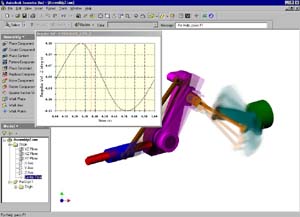 Autodesk Inventor gives you world-class capabilities to design and build
realistic 3D solid models representing the form of your parts.
Inventor also allows you to create assemblies of the 3D solid parts in
order to allow you to clearly understand whether the parts will properly
fit together as an assembly. What Inventor will not do is provide you with
the ability to know if your design will actually meet it's intended (and
sometimes unintended) performance criteria? To determine if a design
will perform as expected, the physical assembly is produced and a series
of costly lab or field tests are done. This testing usually produces
several design changes and the process continues until all production
performance criteria are met.
Autodesk Inventor gives you world-class capabilities to design and build
realistic 3D solid models representing the form of your parts.
Inventor also allows you to create assemblies of the 3D solid parts in
order to allow you to clearly understand whether the parts will properly
fit together as an assembly. What Inventor will not do is provide you with
the ability to know if your design will actually meet it's intended (and
sometimes unintended) performance criteria? To determine if a design
will perform as expected, the physical assembly is produced and a series
of costly lab or field tests are done. This testing usually produces
several design changes and the process continues until all production
performance criteria are met.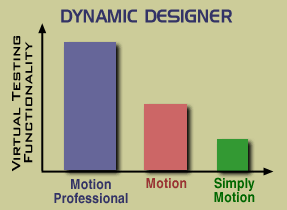
- Home
- Purchase
- DDM for Inventor
- Motion/Professional
- Motion
- Simply Motion
- FAQs
- DDM for Solid Edge
- Choose the right product
- Compare Products
- Success Stories
- Examples
- Licensing
 Quote
Quote Evaluation


